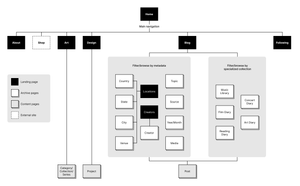
V7: Metadata structure and sitemap
Solidifying the information architecture
I’ve been revising a metadata structure for blog posts and a sitemap for a few months now, and since I haven’t felt the need to tweak either of them in awhile, they’re probably solid enough to document here.
Metadata structure
The blog post metadata has been developed to accommodate a wide variety of post types, to give me a lot of flexibility in how to present them, and to give users a lot of options for browsing them. When seen all together, it looks like a lot, but keep in mind that only two data points are mandatory for all posts (date and canonical_url), and most posts will likely only use a few more beyond that. The specific data points used will differ by post type. Here they all are together in YAML format, which is how they’ll appear in a post file’s front matter (with mandatory data points marked with *):
---
date_added:
date_started:
date: *
title:
description:
link:
topic:
source:
canonical_url: *
series_origin:
series_title:
series_description:
#------------
venue:
city:
state:
country:
#------------
creator:
work_year:
rating:
spoilers:
#------------
layout:
custom_css:
custom_js:
preview_img:
preview_img_alt:
#------------
media:
  - file:
    type:
    width:
    height:
    poster:
    alt:
    subtitles:
    caption:
---
And here are descriptions of the individual data points, broken down by category.
Core metadata
date_started:For posts about multi-day events, this marks the date the event begandate_added:For posts promoting future events, this marks the date the promotion is published. I currently use this for upcoming shows on Tinnitus Tracker, but I’m not sure yet if I’ll use it here.date:The date and time the post was published. This andcanonical_urlare the only mandatory keys for every post.title:The post’s titledescription:A sentence-length description of the postlink:If the post is primarily a link to another site, this is the URLtopic:Essentially tags, one or more broad topics covered in the postsource:The name of the site where the post was first published. Defaults toRobWeychert.comif left blank.canonical_url:The URL where the post was first published. Since no two posts will have the same canonical_url, this is effectively a unique ID for the post. This anddateare the only mandatory keys for every post.series_origin:If the post is part of a series, this is thecanonical_urlof the first post in the series, which will allow me to display all posts in the series. I first came up with this to keep tweet threads together.series_title:If this post is the first in a series, the series can optionally be given a titleseries_description:If this post is the first in a series, the series can optionally be given a description
Location metadata
For posts about events or travel.
venuecitystatecountry:Defaults to United States if left blank and other location metadata is included
Performance/work metadata
If the post is about a performance or work of art, music, film, literature, etc.
creator:One or more people or groups (artist, band, director, author, etc.) responsible for the workwork_year:The year the work was made or releasedrating:My opinion of the work, on a scale of one to fivespoilers:Set to true if the post reveals secrets about the work
Design metadata
If the post has any design customization.
layout:The name of the non-standard layout the post usescustom_css:Set to true if the post has custom CSS extending the site’s existing CSScustom_js:Same as above, but for JavaScriptpreview_img:Set to true if there is a custom preview image for this post, for display via Open Graph, Twitter cards, etcpreview_img_alt:Alternative text for the above
Embedded media metadata
If the post’s primary content is image, video, or audio (e.g. a Flickr or Instagram post).
media:One or more embedded media filesfile:The file nametype:image,video, oraudio(I may omit this and detect by file name)width:Image/video native pixel widthheight:Image/video native pixel heightposter:Video poster image filealt:Image alternative textsubtitles:Video subtitles file name (.vtt)caption:Image/video/audio figure caption
Sitemap
In addition to outlining the site’s overall structure, the sitemap is meant to concisely demonstrate how the metadata structure described above will allow users to browse the blog in many different ways. I think the sitemap is relatively straightforward on its own, but if not, it’ll make more sense in the future in conjunction with some wireframes that are still coming together. In the meantime: