Customizing ordered list styles
A simple and reliable way to use CSS counters
One web browser default I’m seldom satisfied with is the appearance of list markers. Their style can be customized with CSS using li::marker, but the options there are limited. The best way I’ve found to fully customize them is to remove default list styles and use a li::before pseudo-element as a list marker:
ol,
ul {
  list-style: none;
}

li::before {
  content: "•";
}
I’ve used a plain old bullet in this example, but content’s value can be whatever you want, and you can also use position, background, and other properties to customize the list marker to your heart’s content.
This works great for unordered lists (ul), whose markers are all typically uniform. But for ordered lists (ol), whose alphanumeric markers are variable and context-specific, something more is needed. Enter CSS counters, which are essentially numeric variables CSS keeps track of and increments and decrements as needed. You can use CSS counters in lots of ways with pretty much any HTML element, but I’ve only ever used them with ordered lists, beginning by instantiating a counter using counter-reset and giving the counter a custom name, like list-position:
ol {
  counter-reset: list-position;
}
Next, I’ll tell list-position, whose default value is 0, to increment with each list item and make the list item’s ::before content whatever the current list-position value is:
ol li::before {
  counter-increment: list-position;
  content: counter(list-position);
}
For the first item in the list, list-position’s value will be 1; for the second item, the value will be 2; and so on.
This approach does the trick for most ordered lists, allowing you to add styles to li::before to customize the list markers however you want. Great! But note that most lists is not the same as all lists, and this particular implementation of CSS counters isn’t bulletproof. Say your ol has a reversed attribute and is meant to count down rather than up. Or it has a start="2" and is meant to count up from 2 rather than from 1. The above CSS doesn’t account for those cases and will still just count up from 1. CSS counters have additional capabilities that can address these issues, but it means writing even more CSS to make a hacky recreation of a thing HTML already does by default. There has to be a better way!
Well, it turns out there is! I just today learned I can forego counter-reset and counter-increment entirely, and in place of the content reference to the counter I had named list-position, I can just use an existing CSS keyword, list-item, which the counter will increment or decrement automatically according to the needs of the list. Boom.
ol li::before {
  content: counter(list-item);
}
I still wish ::marker could handle all my ordered list styling needs, but as compromises go, CSS counters aren’t bad, and simplifying them further with the discovery of list-item has brightened my day. Here’s my new list-styling boilerplate:
ol,
ul {
  list-style: none;
}

ul li::before {
  content: "•";
}

/* Top-level ordered lists get standard
decimal markers, starting with "1" */

ol li::before {
  content: counter(list-item, decimal);
}

/* Nested ordered lists get lowercase
alphabetical markers, starting with "a" */

ol ol,
ul ol {
  & li::before {
    content: counter(list-item, lower-alpha);
  }
}

/* Further nested ordered lists get lowercase
Roman numeral markers, starting with "i" */

ol ol ol,
ol ul ol,
ul ol ol,
ul ul ol  {
  & li::before {
    content: counter(list-item, lower-roman);
  }
}
Further reading
More design posts
Jack
It bothers me that I can’t remember exactly when and where I met Jack. I’m usually pretty good about that. It was probably 2007-ish, probably at SXSW or An Event Apart. I was going to a lot of conferences back then, meeting all kinds of web people from all over the place, and Jack was a web person, though we didn’t talk about the web all that much once we found other things we had… See more →
V7: Say hello to my listening diary
Monthly reports of my most-played music, going back to 2005
After finally completing the gargantuan task of manually adding metadata to thousands of my old tweets so they could be more integrated with the rest of my site, I wanted to keep the momentum going. So I turned to the last large personal data source that was still missing from my site: Last.fm, a service for tracking and sharing the music you listen to. As of a few days ago, I’ve been a Last.fm user… See more →
V7: Backfilling metadata
Six thousand tweets. Ten months. One taxonomy.
Last week? Not my favorite week. My dog injured her leg while playing with other dogs in the park. My basement needed some emergency masonry work. My acid reflux graduated from intermittent warning shots to full-on assault. But somehow, in the midst of all this, I managed to finish up a project I’ve been chipping away at for countless hours over the past 10 months: manually adding metadata to the nearly 6,000 old tweets I’ve… See more →
Ethan Marcotte’s redesign

My good friend and web design hero Ethan Marcotte has redesigned his personal site for the second time in a little over a year, and it’s a thing of beauty. Every last bit of it is thoughtfully considered without being overworked, from the simple structure, to the inventive grid, to the elegant typography, to the subtle textural motifs. And that joyful splash of watercolor at the top! For the nerds, there are some clever implementations… See more →
Moving on
We’ve been prepping my childhood home for an estate sale taking place in a few weeks, and my primary task has been getting my remaining unsalable old junk out of there. A lot of it has turned out to be assignments from college: a big stack of portfolios filled with charcoal nudes and various graphic design things mounted on black boards with tracing paper overlays for professors’ commentary. Sketches, marker comps, paste-ups, digital prints. Typesetting,… See more →
The absorbingly impenetrable typography of Analogical Force and Geometric Love

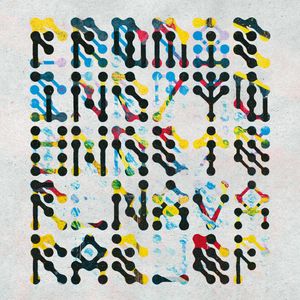



Analogical Force, an electronic music label based in Madrid, found its way onto my radar earlier this year when I picked up Oh Mr. James’s fun I’m Not Here EP. Most of the label’s output honestly doesn’t do much for me, but its design is another story, which for the last several years has largely been handled by the UK-based Geometric Love, a.k.a. Steve Hyland. I especially enjoy Hyland’s fearless lettering, which is almost entirely… See more →
XOXO Explore
In its founders’ own words, XOXO was “an experimental festival celebrating independent artists and creators working on the internet,” and its final edition, which included Cabel Sasser’s charming tale of going all the way down the rabbit hole of a painting that caught his attention in a McDonald’s in Washington, took place in 2024. I attended XOXO in 2014 and 2018 and was impressed on both occasions with the extraordinary care that went into the… See more →
Claire Tabouret’s Stained-Glass Windows for Notre-Dame Divide French Society, with a Legal Threat Looming
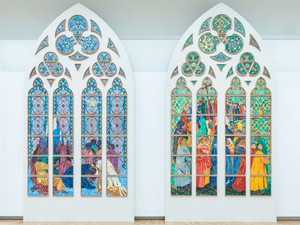
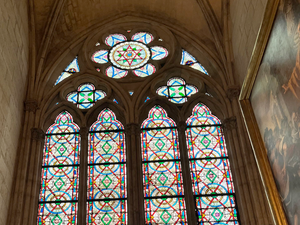
A project has been in the works for a couple years to replace a number of Notre-Dame’s stained-glass windows with contemporary designs, which has unsurprisingly caused an uproar. While the arguments for and against generally take familiar shapes—whether historic architecture should accommodate modern expression, whether these decisions should be top-down or community-driven—one functional aspect of the kerfuffle caught my attention:
The windows’ light gray, non-figurative glass allows more light to enter the cathedral, achieved via… See more →
Loud Room

Jason Santa Maria’s new independent design practice has a great name and a great logo, befitting the quality and character of his work. And the site, an appropriately simple introduction, sports a fresh, fun, procedurally-generated color scheme every time it loads. Don’t miss his blog post with the backstory!